
Cat Battles Beginner Guide: Your First Bout
A practical Cat Battles first-bout guide covering PC inputs, ring awareness, coins, crates, and the three advertised game modes.
FAQ
What should a new Cat Battles player learn first?
What is the advertised objective of a bout?
How do coins fit into the first session?
What are crates advertised to contain?
Where should I check changing facts?
How should a new player approach a first Cat Battles bout?
Start with the five PC inputs and the advertised objective: the official description says to push, slap, and toss cats out of the ring, with the last cat standing winning. Use the controls guide as your quick reference, then build your first-session notes from what you see.
What should you learn before chasing a knockout?
Rehearse one input at a time: Click for Punch, Right Click for Grab, F for Kick, Shift for Lift, and Q for an ability. Start with the action you want to understand, then repeat it from a similar position so your notes are easy to compare.
What should your first-bout checklist contain?
- Confirm the five documented inputs before trying to develop a preferred move.
- Choose one action to observe, then describe the visible result in plain words.
- Note where the opponent is in relation to the ring when you act.
- Record any interface text, resource change, or timer instead of estimating it.
- Repeat the observation before treating it as a reliable pattern.
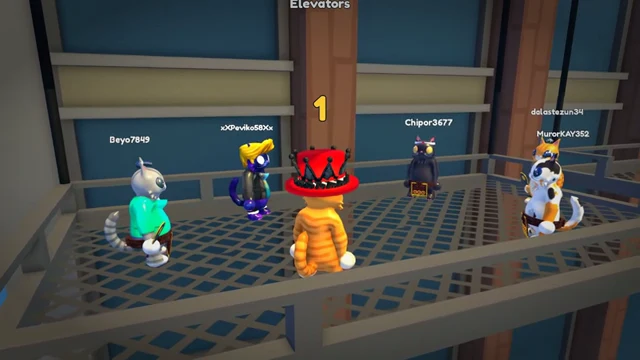
Cats wait on the metal elevator platform during the pre-bout countdown.
During the bout, name the situation before you write a conclusion. For example, record “opponent at the ring edge” and the input you used, then compare that note with a later attempt.

An orange cat lifts an opponent at the ring edge during a sudden-death bout.
How can you practice each input?
Use a short repeatable loop: choose one input, try it in a live bout, describe the visible result, and then repeat with another input. The group scene gives you a clear moment to note a close-range lift or grab.

Several cats lift an opponent in the elevator arena.
Media credit: Cute Malt Games, official Roblox preview asset 83504175164665,
via the official Cat Battles page.
The abilities guide provides a worksheet for recording an ability’s visible effect, target, cost, and cooldown as observations. It starts with the eight names and the Q input from the official listing.
How should you think about coins and crates?
The developer says that players earn coins every bout and open crates for furs, sumo gear, and emotes. Use the displayed coin and crate values in your own notes.
The furs and crates guide lists the named fur examples and a collection log. The codes page records RELEASE, NEWGAME, and CATS as developer-listed free-coin codes.
Which mode should you try first?
The official description advertises Classic, 2 Teams, and 4 Teams. Pick a mode you can identify in the current game, write down the team display and win message, and compare your notes with the game modes guide.
The goal of the first session is a reliable set of inputs and observations. Those notes give you a useful baseline as the game and its official description develop.
Related Articles
guides
Cat Battles Abilities: Ability List and Q Control
See all eight Cat Battles ability names, learn the official Q control, and use a practical worksheet to record what happens in a bout.
guides
Cat Battles Controls Guide: PC Keyboard and Mouse Bindings
Learn the current official Cat Battles PC controls with a quick reference for Punch, Grab, Kick, Lift, and the Q ability input.
guides
Cat Battles Furs and Crates: Coins and Cosmetics Guide
Learn which Cat Battles furs are named officially and how to track coins, crate contents, and collection progress.
Was this helpful?
Thanks for the feedback!